
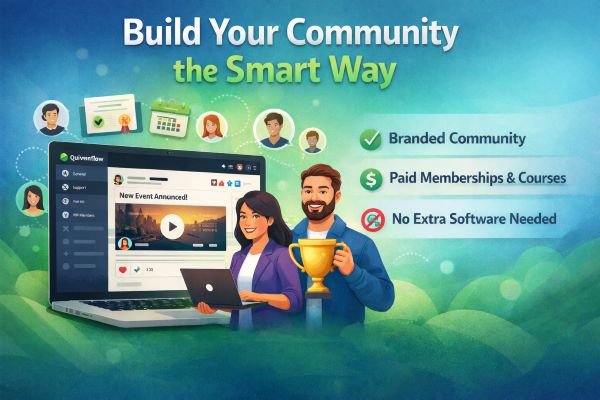
Quiverflow community platform is an all in one solution for building branded online communities under your own domain. It allows businesses to create free or paid groups, courses, memberships, and events without relying on third party platforms like Facebook, Telegram, or Skool.com.
Building a community is no longer optional for modern businesses. Whether you run a SaaS, agency, coaching program, local business, or membership brand, your community is where trust, loyalty, and long term value are created.
The problem is not starting a community.
The problem is choosing the wrong platform.
That is exactly why the Communities module inside Quiverflow exists. Watch demo video.
What Is the Quiverflow Community Platform
When you sign up for Quiverflow, the Communities module comes included inside the Memberships system. There is no separate upgrade, no extra license, and no hidden pricing.
Inside this system, you can:
- Create memberships
- Launch communities
- Publish courses
- Issue certificates
- Manage client portals
All from one platform, under your brand.
Why the Quiverflow Community Platform Replaces Other Community Tools
With Quiverflow, you can create as many communities as you want. Each community can be configured independently, allowing you to support multiple audiences or offers from one account.
You can choose:
- Public or private access
- Free or paid memberships
- Invite only or open registration
- Custom branding per community
- Your own domain instead of a third party URL
Your members log into your website, not Facebook, Telegram, WhatsApp, or another company’s platform.
Why the Quiverflow Community Platform Is Better Than Other Community Software
The community experience will feel familiar to users, similar to a Facebook group, but with far more power and control.
Inside each community you get:
- Multiple channels for different topics or member groups
- A central feed where members can post updates
- Support for images, videos, PDFs, and links
- Likes and comments for engagement
- Private messaging between members
Admins can also create read only channels for announcements or restrict posting to specific roles.
This is the kind of structure that simple chat apps just cannot provide.
Quiverflow Community Platform vs Other Online Community Platforms
Many businesses start their communities on WhatsApp, Telegram, or Facebook groups because they are easy. That works at the beginning, but it does not scale.
Common limitations include:
- No branding control
- No monetization tools
- No structured channels
- No courses or certificates
- No ownership of your audience
- Platform algorithms controlling visibility
As your business grows, these platforms become a bottleneck instead of an asset.
The Skool.com mistake most people make
When businesses outgrow basic chat groups, many move to platforms like Skool.com. On the surface, it looks like a professional upgrade.
In reality, most people quickly discover two problems.
First, it gets expensive.
Second, it still does not do everything.
You often end up paying for:
- Skool for community
- A separate course platform
- Another tool for certificates
- Another system for events or newsletters
Before you know it, you are managing multiple subscriptions, disconnected systems, and a fragmented user experience.
Quiverflow avoids this completely.
Built in monetization and memberships
Quiverflow Communities are designed to be monetized.
You can:
- Charge for access to communities
- Create paid subscriptions
- Gate specific channels or content
- Ask membership questions before approval
- Offer multiple membership tiers
Everything is handled inside one system, with one login for your members.
Courses, certificates, and learning paths
One of the most powerful features is the ability to publish courses directly inside your community.
Members can:
- Complete lessons
- Track progress
- Automatically receive certificates upon completion
This is perfect for coaching programs, onboarding, education based communities, and internal training.
No need for a separate course platform.
Engagement, gamification, and retention
Healthy communities are active communities.
Quiverflow includes built in gamification features such as:
- Leaderboards
- Member levels
- Points and rewards
- Gold and silver rankings for top contributors
These mechanics encourage participation and keep members coming back.
Events, newsletters, and admin tools
Running a community also means managing communication and moderation.
Quiverflow makes this easy with:
- Built in event calendars
- Community newsletters
- Member directories
- Reported content management
- Custom links and resources in the community sidebar
Admins get full visibility and control without relying on third party tools.
Easy setup, scalable by design
Creating a community takes only a few minutes:
- Choose a name and URL
- Add a description
- Upload your logo, cover image, and favicon
- Select public or private access
- Publish and invite members
You can even make communities discoverable in search engines and within the Quiverflow ecosystem.
One platform instead of a software stack
The biggest advantage of Quiverflow Communities is not just features. It is simplicity.
Instead of juggling multiple tools, logins, and subscriptions, you get:
- Communities
- Memberships
- Courses
- Certificates
- Events
- Gamification
All under your brand.
All under your domain.
All in one platform.
Learn more about this feature.
Final thoughts
Communities should be an asset you own, not a dependency on platforms you do not control.
Quiverflow Communities give you the flexibility of modern community platforms, the power of professional tools, and the simplicity of an all in one system.
If you are serious about building a community that grows with your business, Quiverflow is built for exactly that.






0 Comments